






SleekPixel for clothing brand
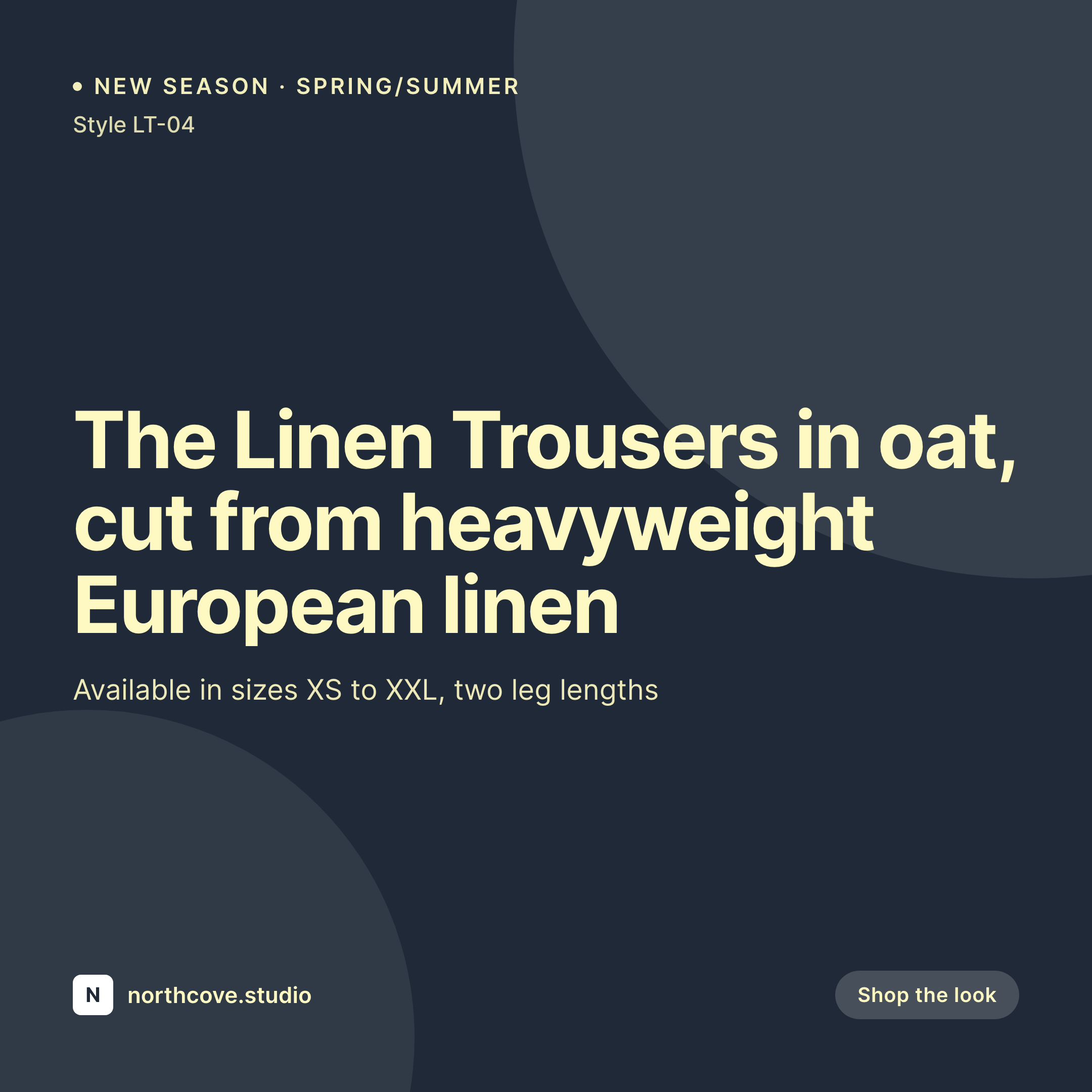
Style name, color, fabric, sizes, and price live as fields on the WooCommerce product. SleekPixel renders a 1080x1080 card on save, so seasonal drops and restocks land on the feed without a design queue.
♾️ Lifetime License available
Seasonal drops break the design pipeline every quarter
An independent clothing brand runs on a seasonal calendar that is unforgiving. Spring/Summer ships in February, the resort capsule in May, Fall in late August, Holiday in October. Each season is twenty to forty styles, each style in three or four colorways, and the design team's first job is the lookbook, not the share images. By the time the social manager opens Canva to start the launch tiles, the lookbook photos have changed twice and the colorway names are still in the producer's spreadsheet.
The data is on the website, eventually. WooCommerce holds style name, color, fabric, country of origin, and price as fields and variation attributes. The product page renders them once the launch goes live. The Instagram grid, the email header, and the OG share preview each get hand-built from the same data source, with the social manager re-typing colorway names and copying hex values from the brand book. The brand drifts a little every season because the manual workflow erodes consistency under deadline pressure.
SleekPixel binds the share image to the style. Define one season-aware template, map the product fields, and every style and colorway saves with a branded card the moment the buyer publishes. The launch hits the feed on time, the email banner is ready before the send, and the brand's seasonal point of view actually reaches customers in the share preview.
Workflow
From new style to live link preview
Map style fields
Design the season template
Publish a new style
Bulk regenerate on rebrand
Output
What gets generated per style
A 1080x1080 Instagram card showing the style name, color, fabric, and price, composed from the WooCommerce product fields and variation attributes.
Comparison
Hand-built launch tiles vs auto-rendered style cards
Manual / Canva / Photoshop
- Each colorway means a new Canva file with the style retyped
- Seasonal drops launch with placeholder banners while design catches up
- Restocks slip past the social calendar because no card was built
- Brand drifts mid-season as colors get eyeballed under deadline
- Rebranding between collections means rebuilding every style card
SleekPixel
- Every style saves with a 1080x1080 card rendered from its own fields
- Style, color, fabric, and price pulled from WooCommerce variations
- Season-aware templates branch on collection or release date
- Stories and OG images generated alongside the square card
- Bulk regenerate the catalog when the brand evolves
Features
What SleekPixel gives you for clothing brand
Per-style card
Every style saves with its own 1080x1080 card. Color, fabric, and price pull from the WooCommerce variation, not a Canva file.
Season-aware
Templates can branch on collection, season, or capsule. Spring/Summer cards read differently from Holiday without a separate design pass.
Lookbook compositing
Lookbook photos composite into the template alongside metadata. The shopper sees the actual styling, not a stock placeholder.
Use cases
Where clothing cards earn their keep
Seasonal drops
New collections launch with matching cards across every style and colorway. The drop reads as one season on the brand's grid.
Restocks and reorders
Bestsellers come back in stock and the card refreshes on save. Customers waitlisted on a colorway see the right preview when notified.
Editorial and lookbook
Lookbook posts and editorial features render share cards alongside the styles they cover, ready for press, email, and Pinterest.
The bigger picture
Why fashion brands lose seasonal coherence without rendered cards
Independent fashion sells a point of view. The customer who buys from a small brand is buying the editor's eye, not a single garment. That point of view is communicated season after season through the lookbook, the campaign film, and the daily grid posts.
When the launch tiles ship late or drift in palette, the season's coherence breaks before the customer ever sees a piece in person. The brand has spent six months designing a cohesive collection and the share previews land in customer chats with mismatched fonts and approximate colors. SleekPixel removes the gap.
The card is a property of the style, so every colorway and every restock carries the season's frame. The design team focuses on the lookbook and the campaign; the catalog of share cards builds itself in the background. Brands that scale across seasons benefit twice, because each new collection inherits the rendering pipeline rather than rebuilding it from scratch.
Questions
Common questions about SleekPixel for clothing brand
Yes. WooCommerce, ACF, Meta Box, or a custom style CPT all work. SleekPixel reads any post type and any field, so style name, color, fabric, sizes, and country of origin can all map onto the template.
Yes. Variation products are fully supported. Each colorway, each fabric option, can render its own card with the right metadata. The customer's chosen variation drives which card the OG tag points at.
Templates can branch on collection or season taxonomy. Spring/Summer can use one accent palette, Resort another, Holiday a third. All variants still pull from the same product fields, so the data never drifts.
Yes. The product's primary image or any gallery image can composite into the template. SleekPixel does not reprocess color, so the lookbook styling stays accurate to the photoshoot.
Yes. A single style can render a 1080x1080 square, a 1080x1920 story, and a 1200x630 OG card in one save. Each format pulls the same product data, sized and laid out per platform.
If the product carries size availability as variations, the template can show the full size range or only the in-stock sizes. Conditional rendering keeps the card honest about what shoppers can actually buy.
Yes. Edit the template, run a bulk regenerate, and every style across every season gets a fresh card. The PNG file in uploads is replaced, so the storefront and social previews stay current without per-product work.
No. SleekPixel renders images for WordPress and writes them to your uploads with og:image meta tags. Cross-posting to Net-a-Porter, SSENSE, or other stockists is a separate workflow handled by their own listing tools.
Pricing
More than 1000+
happy customers
Explore our flexible licensing options tailored to your needs. Upgrade your license anytime to access more features, or opt for a lifetime license for ongoing value, including lifetime updates and lifetime support. Our hassle-free upgrade process ensures that our platform can grow with you, starting from whichever plan you choose.
Lifetime ♾️
Most popular
EUR
once
- Unlimited websites
- Lifetime updates
- Lifetime support
...or get the Bundle Deal
and save €250 🎁
💎 Want everything forever? The All Access Pass is going away on 01.08.2026.
The Bundle (unlimited sites)
Pay once, own it forever
Elevate your WordPress site with our exclusive plugin bundle that includes all of our premium plugins in one package. Enjoy lifetime updates and lifetime support. Save significantly compared to buying plugins individually.
What’s included
-
SleekAI
-
SleekByte
-
SleekMotion
-
SleekPixel
-
SleekRank
-
SleekView
€749
Continue to checkoutBrowse more
- Snapchat snap images
- WhatsApp status images
- Shopify product images
- Substack post thumbnail
- Kick channel banners
- Tidal cover art
- Discord server icon
- LinkedIn event banners
- Klaviyo email headers
- Shopify collection banners
- GitHub social preview images
- Apple Podcasts covers
- Slack channel headers
- Dribbble shot covers
- Pinterest video pin covers