






SleekPixel for MemberPress content
SleekPixel reads MemberPress course, lesson, and access rule data and renders a matching share image on save. Public teaser pages get a card that names the course and module, even when the body is gated.
♾️ Lifetime License available
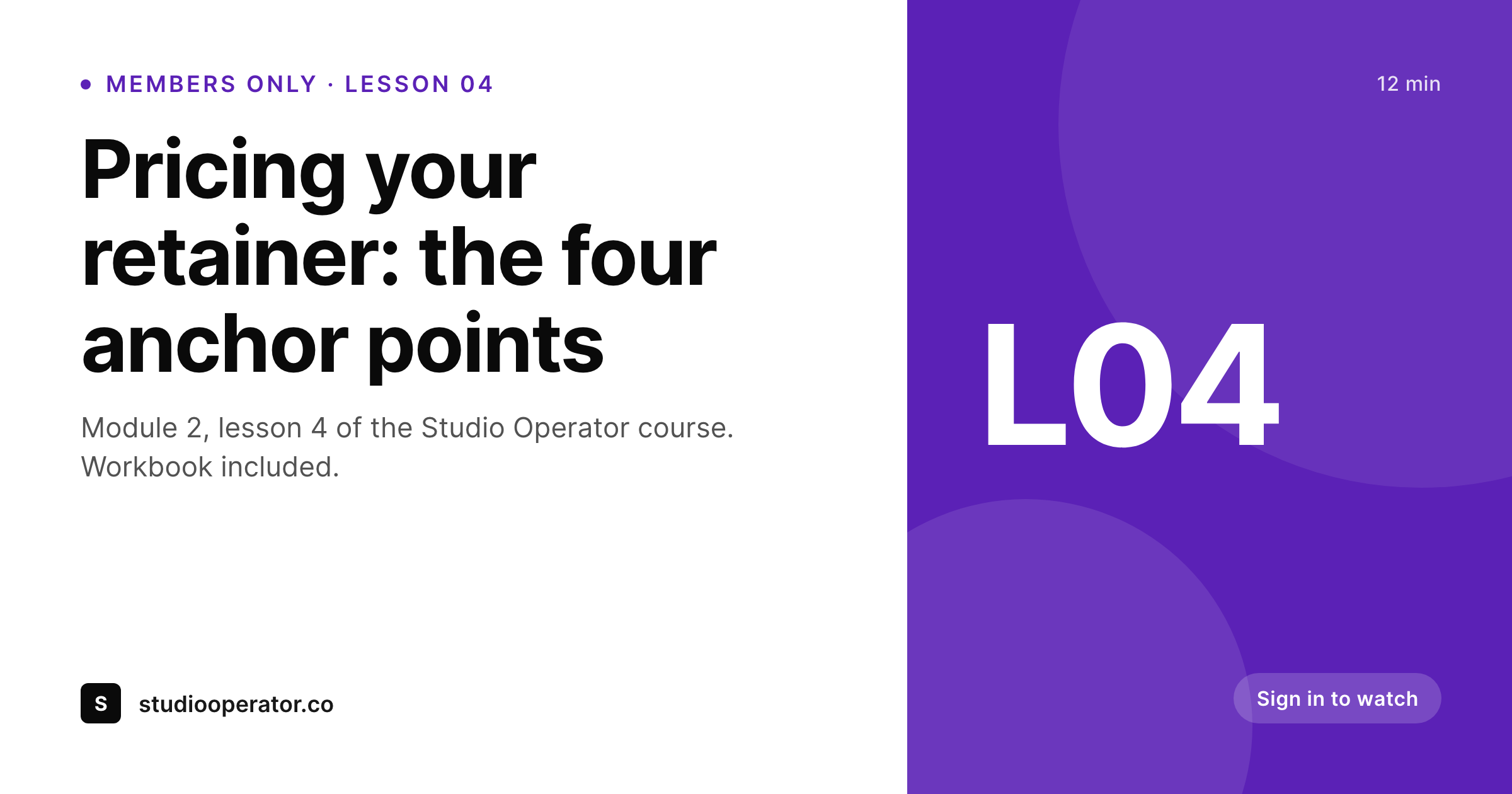
Gated content still needs to share well
MemberPress hides the body of a protected lesson from non-members, which is the whole point. The trade-off is that share previews go thin: the page title plus a stock featured image, with no signal that this is part of a paid course or which module it belongs to. Members who want to send a friend a peek at lesson four end up posting a bare link, and the unfurl looks identical to a free blog post.
SleekPixel uses the MemberPress course and lesson taxonomy to compose a card that names the parent course, the module number, and the lesson title together. The teaser excerpt is allowed because the protection rules cover the body, not the meta. Instructor name and avatar flow in from user meta if your course assigns one. The visible card answers what this is and where it sits, which is the whole job of a share preview for a course product.
The image saves as a real PNG to uploads, the same way any featured image does, and og:image and twitter:image point at it. MemberPress content protection plays cleanly with the head tags. Your access rules continue to gate the body and any video embeds. The card is just the preview a non-member sees on Slack or LinkedIn, and now it tells them this is lesson 04 of the Studio Operator course rather than a generic article.
Workflow
From protected lesson to branded card
Map MemberPress fields
Save a lesson
Meta tags update
Reorder freely
Output
What gets generated per lesson
An OG and Twitter card sized 1200 by 630 with course name, lesson number, title, and instructor handle - written into the post head and saved to uploads.
Comparison
Static featured image versus SleekPixel
Featured image only
- Lesson share previews show the course thumbnail with no module number or lesson title overlay
- Members can't tell at a glance which lesson a teammate just shared in Slack
- Instructor changes in MemberPress don't propagate to old social cards
- Course relaunches mean re-exporting hundreds of lesson graphics by hand
- Free teaser pages and gated lessons look identical in social previews
SleekPixel
- Reads MemberPress course taxonomy and lesson order to compose the card
- Includes instructor name and avatar pulled from WordPress user meta
- Regenerates when you rename a course or reorder modules
- Plays cleanly with MemberPress access rules - card is public, body stays gated
- Works with Courses add-on, single posts, and standalone protected pages
Features
What SleekPixel gives you for MemberPress content
Course aware
Reads the MemberPress courses taxonomy so each lesson card names the parent course, module number, and lesson title in one composition.
Instructor credit
Pull the assigned instructor's display name and avatar from user meta. The teaser card shows who is teaching, not just what.
Respects access rules
Body protection stays untouched. SleekPixel only writes the og:image meta tag, so non-members see the card and gated content stays gated.
Use cases
Where course share cards earn their keep
Multi-module courses
Each lesson share carries its module and lesson number. Members and prospects can navigate directly to the right place from a Slack share.
Members-only newsletters
Issue archives behind a paywall still need shareable previews. SleekPixel cards show issue number, title, and date even when the body is gated.
Cohort and group programs
Cohort-based programs use the course taxonomy to badge each lesson with its cohort label, so a member sharing back into a private community lands in the right thread.
The bigger picture
Why protected content needs better previews
A course business sells the path, not the page. Lesson 04 only matters in the context of lessons 01 through 03 before it and 05 onward, and a member sharing a single link is implicitly inviting the recipient to imagine that path. A bare title with a generic featured image hides the structure that justifies the price.
Naming the parent course and the module number on the share card surfaces the architecture in three seconds, before the click. MemberPress already organises this data through its courses taxonomy and access rules. SleekPixel just turns that data into a visible artefact at preview time.
There is also a cold-share angle: many MemberPress sites mix free posts with gated lessons, and the unfurl is the only signal a non-member gets before deciding to sign up. A card that reads Module 2, Lesson 4 of the Studio Operator course, with the instructor's avatar, communicates more about the product than the homepage hero ever does. None of this requires changing a single access rule.
Questions
Common questions about SleekPixel for MemberPress content
No. SleekPixel only writes the og:image and twitter:image meta tags into the document head. Body protection, redirects, and partial content rules continue to apply exactly as MemberPress configures them. The card is a public preview, not gated content.
Yes. The MemberPress Courses add-on stores lesson order on the lesson post, and SleekPixel reads that value during render. Most templates show 'Lesson 04' or 'Module 2, Lesson 4' depending on whether you also reference the module.
Yes. Standalone protected posts and pages render perfectly well. The course-specific overlays simply do not appear, but title, excerpt, and any custom fields remain available to the template.
If you use the MemberPress excerpt rule to show the first paragraph to non-members, that excerpt is still readable on the page itself. The SleekPixel card never duplicates protected body text - it only uses the title, course taxonomy, and explicitly-mapped fields.
Yes. MemberPress products store a price meta value, and you can map it onto the card if you want the share preview to show '$48 / month' or 'Included with Pro'. Most course operators leave this off the share card and keep it on the sales page.
If your lesson custom field stores multiple user IDs, the template can loop and render up to two avatars before falling back to a 'plus 3 more' label. For the typical solo-instructor case it just shows the assigned instructor's avatar and name.
Reminders are an email feature - they do not render social cards. SleekPixel handles the share preview side. The two run independently: the email goes out from MemberPress, and the link in it unfurls with a SleekPixel-rendered image.
Yes. The bulk regenerate command walks the lesson custom post type and rebuilds every image. This is useful after a course rebrand or after changing the template - you do not have to open and re-save each lesson manually.
Pricing
More than 1000+
happy customers
Explore our flexible licensing options tailored to your needs. Upgrade your license anytime to access more features, or opt for a lifetime license for ongoing value, including lifetime updates and lifetime support. Our hassle-free upgrade process ensures that our platform can grow with you, starting from whichever plan you choose.
Lifetime ♾️
Most popular
EUR
once
- Unlimited websites
- Lifetime updates
- Lifetime support
...or get the Bundle Deal
and save €250 🎁
💎 Want everything forever? The All Access Pass is going away on 01.08.2026.
The Bundle (unlimited sites)
Pay once, own it forever
Elevate your WordPress site with our exclusive plugin bundle that includes all of our premium plugins in one package. Enjoy lifetime updates and lifetime support. Save significantly compared to buying plugins individually.
What’s included
-
SleekAI
-
SleekByte
-
SleekMotion
-
SleekPixel
-
SleekRank
-
SleekView
€749
Continue to checkoutBrowse more
- Klaviyo email banner
- YouTube thumbnails
- Ghost feature images
- Beacons.ai banner
- Facebook group banners
- Passes page banner
- YouTube podcast thumbnails
- Bluesky profile banner
- Reddit subreddit banners
- LINE official account banners
- Instagram carousel slides
- Twitch overlay
- Slack channel headers
- Instagram highlight covers
- TikTok Now image