






SleekPixel for stationery brand
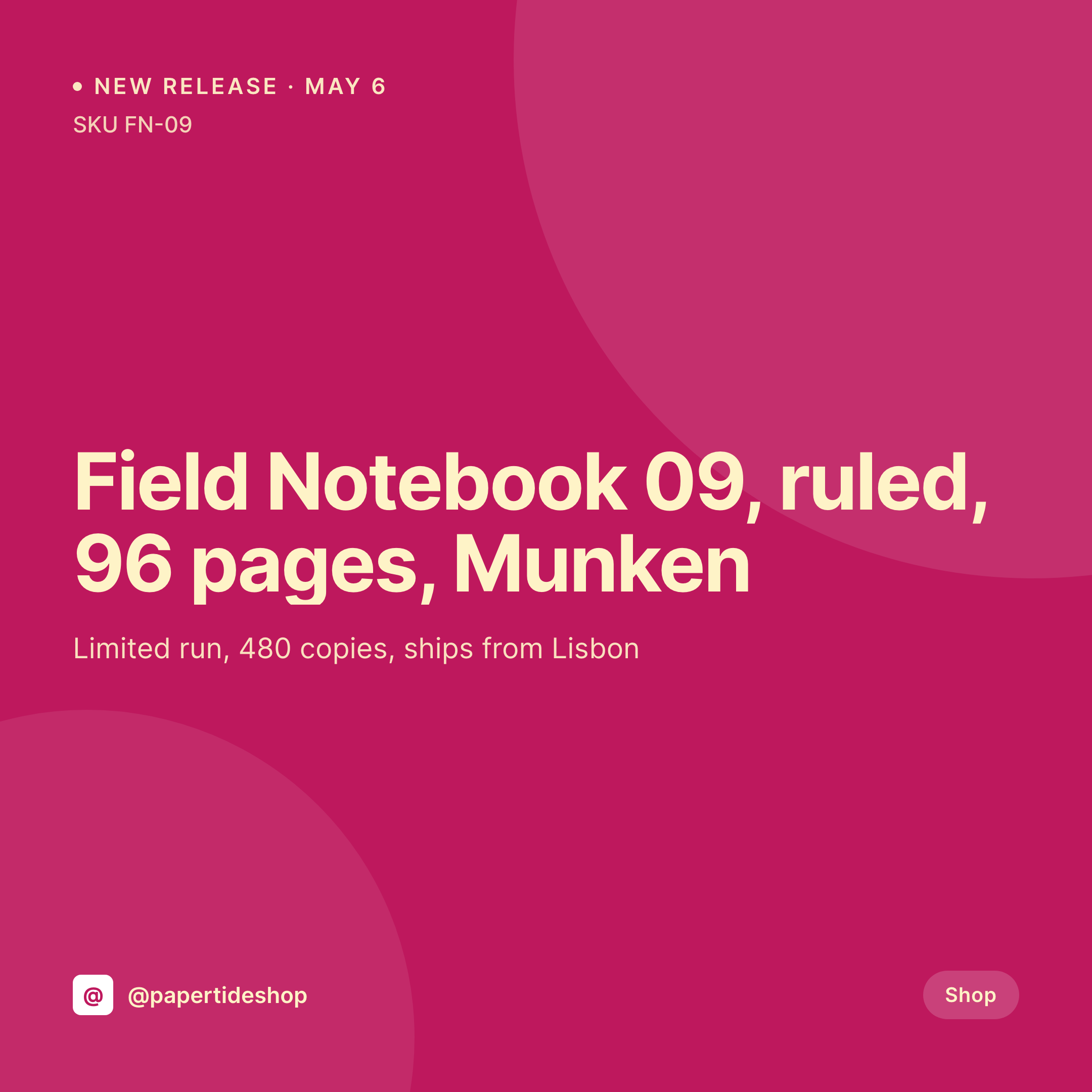
A new ruled notebook, a refilled fountain-pen ink, a limited holiday set. Each WooCommerce product or release post becomes a 1080x1080 card the social team can post the morning the SKU goes live.
♾️ Lifetime License available
Drop days, restocks, and the daily card grind
A stationery brand's grid is built on drops and restocks. A new notebook on Tuesday, a fountain-pen ink restock on Friday, a holiday gift set the week before December. Each one is a square image with the product name, the SKU, the paper or material, the price, and a clean studio photo. Each one needs to ship the morning the product page goes live so the launch on Instagram lines up with the launch on the shop.
The data is already on the WordPress site. The brand runs WooCommerce or EDD, and each product has fields for paper, page count, binding, dimensions, and run size. The hero photo is in the media library after the photographer hands the shoot off. The typing is done at the time the product was set up. The gap is the 1080x1080 PNG that the marketing team would otherwise build in Figma every drop day.
SleekPixel renders that PNG on save. The product post saves at 09:00, the release card lands in uploads with the SKU, paper, run size, and price already set. The social team posts at 09:30 when the shop goes live. The grid stays consistent across a year of releases because the template was set once and never moves.
Workflow
From product entry to drop day
Map product fields
Design one square template
Schedule the product release
Post on drop day
Output
What gets generated per release
A 1080x1080 square card with the product name, SKU, paper, page count, run size, and price. Pulled from the WooCommerce product or release post.
Comparison
Default stationery brand image vs SleekPixel
Default stationery brand image
- Marketing builds a Figma file per release the morning of the drop
- SKU or paper name on the card drifts from what the shop page lists
- Run size shown on the card lags behind the actual quantity printed
- Notebooks, pens, and cards each end up with subtly different fonts
- Holiday sets and core products use mismatched templates
SleekPixel
- Save the product post, the 1080x1080 release card lands in uploads
- SKU, paper, page count, run size, and price pulled live from the product
- Square format sized for Instagram and Pinterest grids
- Sidebar download for the marketing team to post on drop day
- One template across drops and seasons keeps the grid coherent
Features
What SleekPixel gives you for stationery brand
Card per SKU
Every new notebook, pen, ink, or set saves with a square card. The SKU, paper, and run size come from the product post.
Product specs included
Paper weight, page count, dimensions, and binding from the WooCommerce fields render on the card so the post is also a spec sheet.
Drop day fast lane
Product is saved at 09:00, the release card is in uploads. The marketing team downloads from the sidebar and posts at 09:30.
Use cases
Who uses SleekPixel for stationery brands
Notebook and journal brands
Each new ruled, dotted, or blank notebook drop renders with the paper, page count, and run size pulled from the WooCommerce product.
Pen and ink brands
Fountain-pen drops, ink refills, and limited-color releases each get a card-per-SKU with nib size or ink color in the template.
Gift set and seasonal brands
Holiday sets, back-to-school bundles, and Mother's Day collections render with the set contents and price pulled live.
The bigger picture
Why stationery brand grids look professional or amateur on first glance
A stationery brand's Instagram grid is the storefront. A first-time visitor who finds the brand through a Pinterest pin decides within four or five card glances whether the brand looks like a real studio or a hobbyist shop. The cards that lose that decision are usually the ones designed in Figma on the morning of the drop, with a slightly different crop, a slightly off type size, and a SKU that doesn't quite match what's on the product page.
The fix is to derive the card from the product. The SKU, the paper, the page count, the dimensions, and the price are typed once in the WooCommerce fields. Saving the product renders the card with those values into a template designed alongside the brand's printed catalog.
The grid reads as one brand across a year of drops because the template doesn't shift, and the drop day work shrinks from an hour of design to a 30-second download and post.
Questions
Common questions about SleekPixel for stationery brand
All three. SleekPixel reads any post type and any field, so WooCommerce products, EDD downloads, and custom product CPTs all feed the same template.
Yes. Each variation can render its own card if variations are stored as separate products or as fields the template can read. The notebook in moss and the notebook in clay each get their own image.
Yes. Editing the product re-renders the card with the new values. The image attached to the product URL is always current with the shop.
Yes. A status field on the product can switch the badge text and the accent color on the template so a sold-out card reads differently from a new release.
Yes. A single save can produce a 1080x1080 grid card, a 1000x1500 Pinterest pin, and a 1200x630 OG image. Each format is configured once and renders together.
No. SleekPixel renders the image and saves it to uploads. Posting is a manual step from the platform app or a scheduling tool.
Yes. The OG image is wired to the same render. A customer sharing a product link in Slack or DMs sees the release card in the preview.
No. SleekPixel renders static PNG and JPG only. Animated stories and product videos are out of scope, the focus is still images tied to the product data.
Pricing
More than 1000+
happy customers
Explore our flexible licensing options tailored to your needs. Upgrade your license anytime to access more features, or opt for a lifetime license for ongoing value, including lifetime updates and lifetime support. Our hassle-free upgrade process ensures that our platform can grow with you, starting from whichever plan you choose.
Lifetime ♾️
Most popular
EUR
once
- Unlimited websites
- Lifetime updates
- Lifetime support
...or get the Bundle Deal
and save €250 🎁
💎 Want everything forever? The All Access Pass is going away on 01.08.2026.
The Bundle (unlimited sites)
Pay once, own it forever
Elevate your WordPress site with our exclusive plugin bundle that includes all of our premium plugins in one package. Enjoy lifetime updates and lifetime support. Save significantly compared to buying plugins individually.
What’s included
-
SleekAI
-
SleekByte
-
SleekMotion
-
SleekPixel
-
SleekRank
-
SleekView
€749
Continue to checkoutBrowse more
- Etsy listing images
- Discord event cover
- eBay listing images
- Threads post images
- Klaviyo email headers
- Fanvue page banner
- Discord server icon
- Twitch panel images
- Open Graph images
- podcast cover art
- Poshmark listing images
- Mastodon link previews
- LinkedIn banner images
- YouTube end cards
- Audible audiobook cover