






SleekPixel for Figma files
Figma owns the design source of truth, but design-system release notes and case-study posts often share with a flat thumbnail of the cover frame. SleekPixel reads Figma file metadata synced into WordPress and renders branded Twitter cards per file, with version, designer and updated date pulled in.
♾️ Lifetime License available
Figma covers are not share previews
Design teams publish a lot of meta-content about their design work: release notes for design systems, case studies for shipped features, recap posts about a sprint of UI updates. Most of that content lives on WordPress or another marketing CMS, not in Figma itself. When the post links back to a Figma file (a public link, a duplicate-this-file template, a community post), the share preview is the cover frame thumbnail. That thumbnail is rarely sized for share dimensions and usually does not carry the team's branding.
The fields a real share card would use all exist: the file name, the version label, the lead designer, the last-updated timestamp, the page count. None of them reach the share preview because Figma does not produce custom OG images for its files and a default WordPress theme does not know anything about Figma concepts.
SleekPixel runs on the WordPress side. Figma files referenced from a WordPress post get bound fields: name, version, designer, updated date, scope. SleekPixel reads those fields and renders a 1200 by 675 Twitter card with the file name as the headline, the version as a badge, the designer as a credit and the team wordmark. Cross-posted design content stops sharing as a thumbnail and starts sharing as a real publication.
Workflow
From Figma file to branded share card
Sync Figma metadata into WordPress
Build the file template
Render on update
Share the WordPress URL
Output
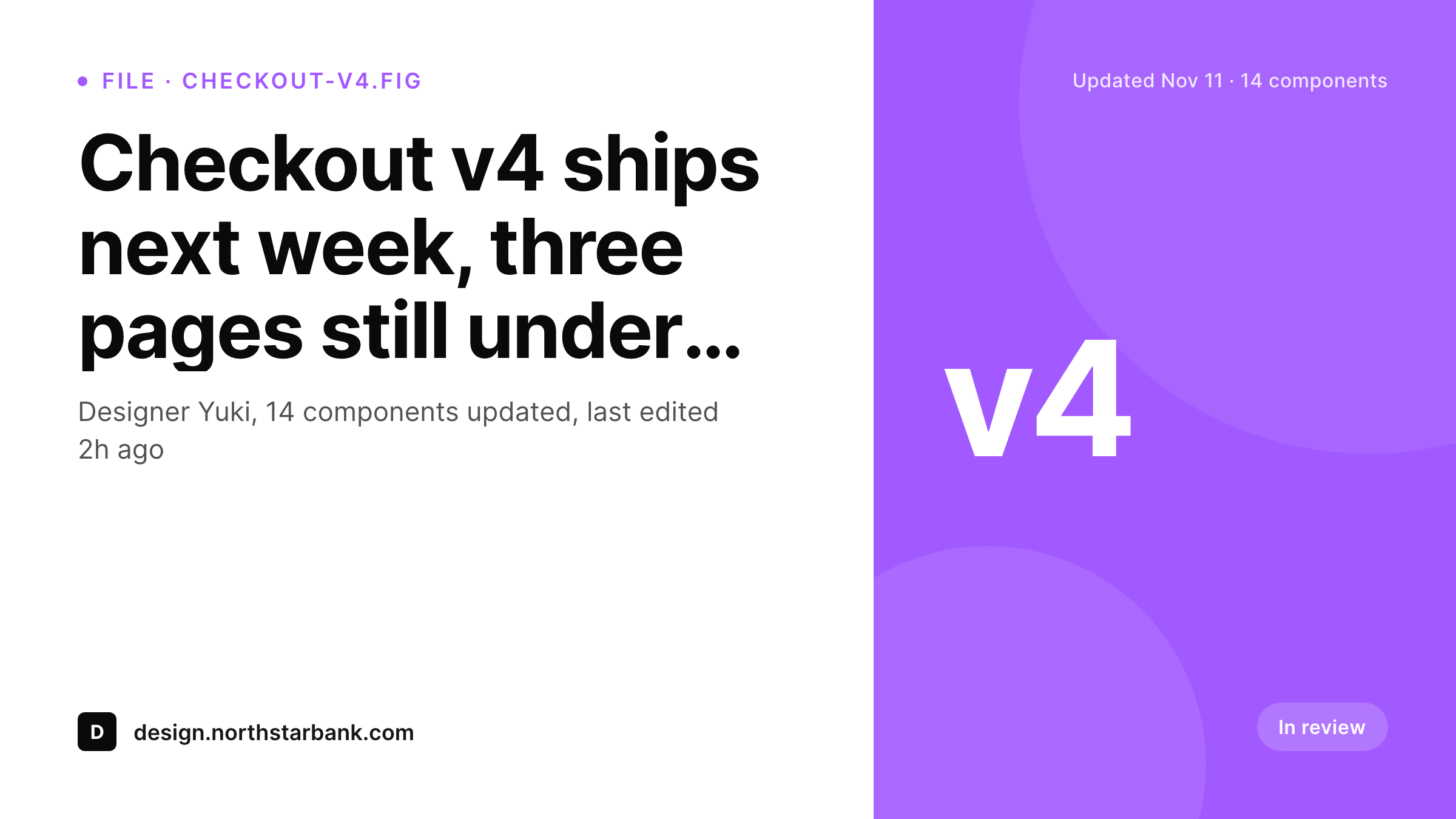
Sample Figma file Twitter card
A 1200 by 675 Twitter card: file name, version badge, designer credit, updated date and brand wordmark, rendered from the WordPress post that references the Figma file.
Comparison
Figma cover thumbnail vs SleekPixel card
Figma cover thumbnail
- Figma cover thumbnails crop awkwardly at Twitter card dimensions
- File version labels and designer credits never reach the share preview
- Design-system release notes share with a generic theme banner instead
- Manual Twitter card design stops happening after the first release
- Brand refreshes leave every past file's preview visually mismatched
SleekPixel
- Reads WordPress fields synced from Figma file metadata via the Figma API
- File name, version, designer and updated date bind to template slots
- Re-renders when the synced file metadata changes
- Bulk re-render the file archive after a brand refresh
- Leaves the Figma file untouched, only the WordPress share preview changes
Features
What SleekPixel gives you for Figma files
Version badge rendering
Version labels (v2, v3, beta-4) render as a corner badge so the share telegraphs which release the post is about. Helpful for design-system communication.
Designer credit
Lead designer and supporting designers credit on the card. Design-system release notes carry the designer's name through the share, not just the brand mark.
Updated timestamp
Last-updated date renders as part of the card meta, so a viewer can tell at a glance whether a file is the active version or a historical record.
Use cases
Who shares Figma files as branded cards
Design-system release notes
Each release of the design system has a release-notes post with a branded card. Designers across the company share new component releases with the actual version on the preview.
Shipped-feature case studies
Product design teams publish case studies on shipped features. Each case study links to the Figma file and shares with a card carrying the file name and version.
Community templates
Studios that publish Figma community templates back the duplicate-this-file links with WordPress posts. Each template share shows the file name and last-updated date.
The bigger picture
Why design teams ship better when their content shares like a publication
Design organizations produce a lot of meta-content about their own work: release notes, case studies, retrospectives, community templates, conference talks. That content is how a design team builds reputation outside its own company and how it attracts the next generation of designers to join. The share preview is the half-second of that meta-content that lands in someone's feed.
A Figma cover thumbnail is the path of least resistance and the worst possible outcome: the share looks generic, the work behind it looks ordinary, and the team's voice gets flattened. A branded card with the file name, the version and the designer credit does the opposite: every release-notes post and every case study contributes to a coherent body of public work. SleekPixel does not replace Figma and does not aspire to.
Figma keeps running the design work. WordPress becomes the brand layer for the design content that gets published outside, and the card renders from the fields you sync from Figma. Designers stop spending Fridays mocking up Twitter cards and start shipping the content with the share preview already built.
Questions
Common questions about SleekPixel for Figma files
No. SleekPixel reads WordPress post fields. File metadata reaches WordPress through the Figma REST API, a Zapier scenario or a manual paste. Once the post has the fields, SleekPixel renders the card.
A scheduled script using the Figma REST API is the cleanest path. It reads file name, version, last-modified and the team member list, then upserts the WordPress post via the REST API. Webhooks from Figma can trigger immediate updates.
Yes, by pulling a frame thumbnail through the Figma API and storing it as the post's featured image. The card template can then render that thumbnail in a small slot next to the title, with the rest of the card carrying brand styling.
FigJam boards are a separate page-group on the SleekPixel marketing site because the typical content is different (workshop boards, brainstorms). The underlying mechanism is the same: sync the metadata to WordPress, render a card.
A small change log can render on the card if the synced fields include the most recent version note. Full version history is better left in Figma itself, with the card linking back.
Component status (ready for dev, in progress, deprecated) syncs as post fields and can drive a status badge on the card. Useful for design-system communication where the readiness state matters more than the file name.
Yes, because nothing reaches WordPress unless your sync rule pushes it. Confidential files can be filtered at the sync layer. The card render only sees what was deliberately exposed.
Yes. Many studios publish a WordPress companion page for each community file, which is where the duplicate-this-file link lives. The card on that page carries the studio's branding instead of the Figma cover thumbnail.
Pricing
More than 1000+
happy customers
Explore our flexible licensing options tailored to your needs. Upgrade your license anytime to access more features, or opt for a lifetime license for ongoing value, including lifetime updates and lifetime support. Our hassle-free upgrade process ensures that our platform can grow with you, starting from whichever plan you choose.
Lifetime ♾️
Most popular
EUR
once
- Unlimited websites
- Lifetime updates
- Lifetime support
...or get the Bundle Deal
and save €250 🎁
💎 Want everything forever? The All Access Pass is going away on 01.08.2026.
The Bundle (unlimited sites)
Pay once, own it forever
Elevate your WordPress site with our exclusive plugin bundle that includes all of our premium plugins in one package. Enjoy lifetime updates and lifetime support. Save significantly compared to buying plugins individually.
What’s included
-
SleekAI
-
SleekByte
-
SleekMotion
-
SleekPixel
-
SleekRank
-
SleekView
€749
Continue to checkoutBrowse more
- product update images
- press release
- build in public cards
- release note cards
- win celebration cards
- product tour cards
- playlist cards
- seed round cards
- hiring announcement images
- discount code cards
- weekly ship cards
- fundraising announcement cards
- sprint recap card
- data visualization cards
- poll result card
- YouTube banner art
- Open Graph images
- Substack post thumbnail
- YouTube Shorts covers
- Twitch starting soon screen
- YouTube end screens
- VK community cover photos
- Mailchimp email headers
- Facebook Marketplace images
- Kick channel banners
- Rednote (Xiaohongshu) post
- Shopify collection banners
- SoundCloud track art
- Threads story-style images
- YouTube thumbnails