






SleekPixel for Mautic campaigns
Mautic runs the automation, WordPress runs the landing page, and SleekPixel renders the share image that meets every forwarded URL. Campaign name, segment, status and contact count pull straight from the linked Mautic post.
♾️ Lifetime License available
Mautic teams ship campaigns faster than their visuals catch up
Mautic powers the kind of marketing teams who refuse to hand their contact data to a hosted CRM. The platform is excellent at the automation: campaigns, segments, decisions, lead scoring, triggered emails. The weak spot is the public face of the campaign, which usually lives on a WordPress landing page or blog post that promotes a webinar, a launch or a download. That landing page is the one piece that escapes the Mautic interface, and it is also the only piece anyone outside the company sees.
So Mautic operators end up in a familiar bind. The campaign is ready, the automation tested, the contacts segmented. The landing page is up. And then the launch tweet, the LinkedIn post and the Slack share all preview with whatever default OG image the theme provides. The brand cohesion that the team built inside Mautic falls apart at the share layer.
SleekPixel binds the share image to the WordPress post that promotes the campaign. Campaign name, segment label, start date and even live contact counts can render onto a branded card on save. When the campaign goes live, the share image is already there. When the campaign updates, a single save refreshes every preview across every channel that ever quoted the URL.
Workflow
From Mautic campaign to share-ready in one save
Link Mautic to WordPress
Build the campaign template
Bind the fields
Promote anywhere
Output
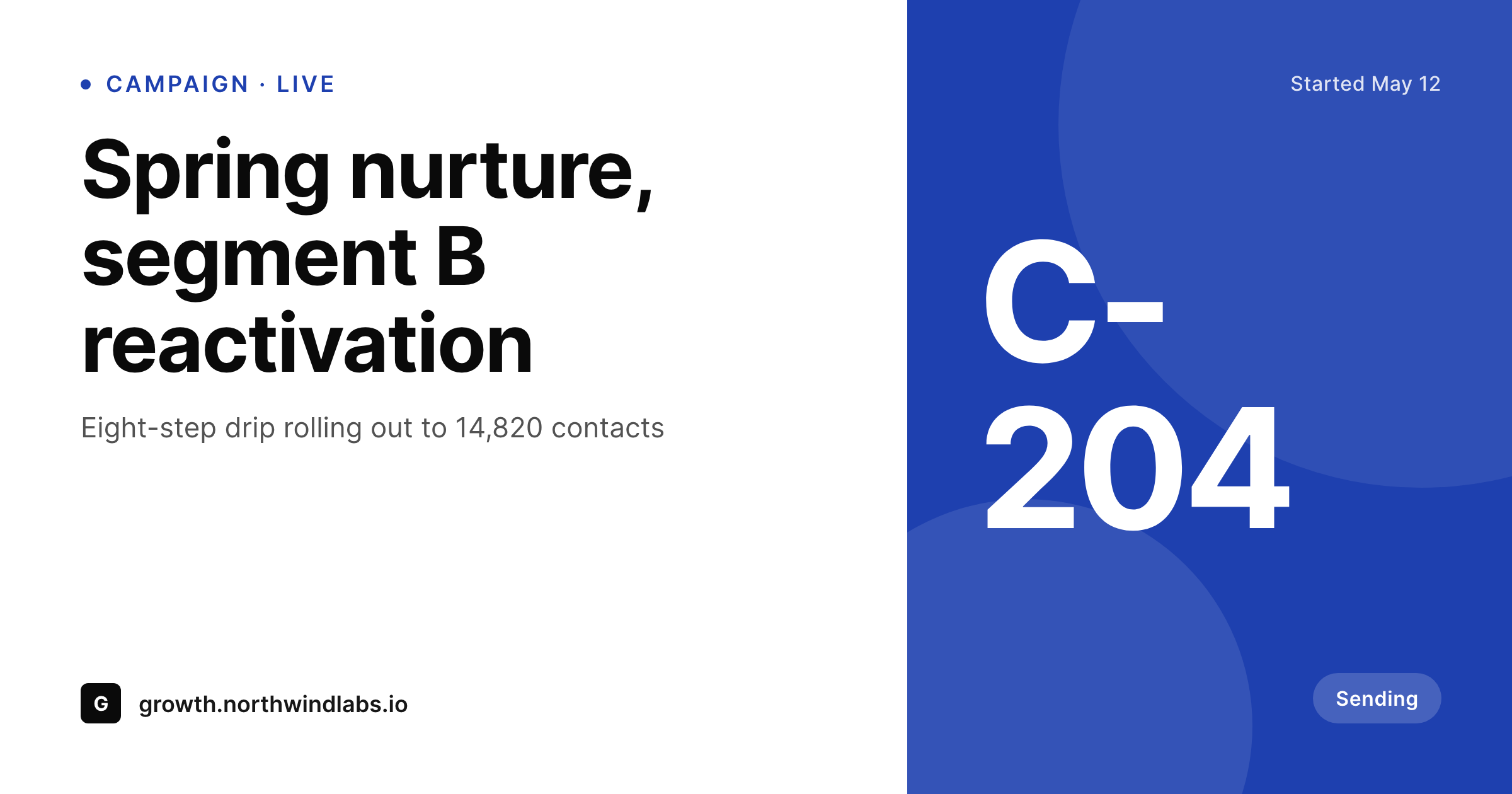
Sample campaign share card
A 1200 by 630 OG image rendered from a real Mautic campaign record - name, segment, status and contact count, in your brand colors.
Comparison
Default Mautic landing-page OG vs SleekPixel
Default theme OG image
- Default OG on Mautic landing pages falls back to the homepage banner
- Campaign name and segment never appear on the preview thumbnail
- Affiliate and partner shares look identical regardless of campaign
- Manual social art lags every campaign launch by at least a day
- Brand updates require rebuilding card art per campaign in Canva
SleekPixel
- Reads campaign name, segment and status from Mautic via the WP API connector
- Renders branded OG and Twitter cards on save with no manual exports
- Self-hosted output stays inside your stack, matching Mautic's data philosophy
- Bulk re-render every campaign card when the brand template changes
- Status-aware variants for live, paused and completed campaigns
Features
What SleekPixel gives you for Mautic campaigns
Mautic-aware fields
Campaign name, segment, contact count and status come from the Mautic record. No duplicate data entry on the WordPress side.
Stays self-hosted
Templates render on your server and PNGs land in your uploads. Nothing leaves the box, which is the reason most teams chose Mautic in the first place.
Per-state variants
Active campaigns render with a 'live' badge, paused campaigns swap to muted brand colors, finished campaigns shift to archive treatments.
Use cases
Where Mautic teams use SleekPixel
Campaign launch promo
Launch tweets and partner shares carry a branded card with the campaign name and start date, instead of a stretched homepage banner.
Webinar and event signups
Webinar landing pages share with the speaker, date and registration count rendered onto the card, refreshed on every save.
Lifecycle re-engagement
Reactivation drips that send to dormant segments get share images that match the campaign theme rather than the corporate homepage.
The bigger picture
Why share previews matter for self-hosted marketing
Self-hosted marketing teams chose Mautic because they want control over their data and their stack. That same instinct is exactly why they should not let share images become the leak in the system. A campaign that took weeks of planning, careful segmentation and copy testing should not land on social with a stretched homepage banner that says nothing about the offer.
Branded share previews extend the same care the team applied to the automation out to the channels that drive new contacts in. The second reason is iteration. Mautic campaigns rarely ship once.
Subject lines change, segments shift, timing windows move. Every change is reflected on the landing page, and every share of that landing page picks up the new version. With SleekPixel the preview moves with the campaign, so a partner who reshares the URL on day fourteen sees the current version of the offer rather than the launch-day stub.
Over a year of campaigns the cumulative effect on click-through and pipeline is measurable.
Questions
Common questions about SleekPixel for Mautic campaigns
No. The image renders once on save, using whatever Mautic data has been pulled into the WordPress post as custom fields. Page views serve a static PNG from your uploads directory.
Most teams use the Mautic-WP integration, a custom Mautic REST sync, or a small companion plugin that pulls campaign data into post meta on a schedule. SleekPixel then reads from post meta like any other field.
Yes, as of the last sync. If the synced contact count updates hourly, the share image will reflect that count after the next save or the next bulk re-render. SleekPixel does not poll Mautic itself.
Mautic A/B routing happens before WordPress responds. Each variant can be a separate WordPress post with its own SleekPixel template, so different variants render distinct share images.
Yes. If your WordPress site uses WPML, Polylang or similar, each translated post renders with its own SleekPixel image. Locale-specific copy on the share card comes from the translated post fields.
No. The render runs on the WordPress save hook, after the sync has already written its data. Mautic itself never touches SleekPixel.
Yes. The template lives in WordPress, so a staging WordPress site with a staging Mautic connection uses the same SleekPixel template as production. The Mautic data differs, the rendering pipeline does not.
All rendering happens on your WordPress server. Generated PNGs live in your uploads folder. No third-party rendering service is called, which matches the reason most teams run Mautic in the first place.
Pricing
More than 1000+
happy customers
Explore our flexible licensing options tailored to your needs. Upgrade your license anytime to access more features, or opt for a lifetime license for ongoing value, including lifetime updates and lifetime support. Our hassle-free upgrade process ensures that our platform can grow with you, starting from whichever plan you choose.
Lifetime ♾️
Most popular
EUR
once
- Unlimited websites
- Lifetime updates
- Lifetime support
...or get the Bundle Deal
and save €250 🎁
💎 Want everything forever? The All Access Pass is going away on 01.08.2026.
The Bundle (unlimited sites)
Pay once, own it forever
Elevate your WordPress site with our exclusive plugin bundle that includes all of our premium plugins in one package. Enjoy lifetime updates and lifetime support. Save significantly compared to buying plugins individually.
What’s included
-
SleekAI
-
SleekByte
-
SleekMotion
-
SleekPixel
-
SleekRank
-
SleekView
€749
Continue to checkoutBrowse more
- Lemmy post images
- Gumroad product covers
- Twitch offline banners
- Substack post headers
- Kick stream thumbnails
- Twitch alert
- Apple Music cover art
- Facebook cover photos
- Audible audiobook cover
- Instagram Shop product images
- X community banners
- Dribbble shot covers
- WhatsApp status images
- KDP paperback cover
- TikTok shop images