






SleekPixel for embroidery shop
Left chest fleece runs, hat patches, the new sample pulled off the Tajima this morning. Each order or digitizing post on the menu CPT renders into a 1080x1080 card the front office can post the moment the hoop comes off the machine.
♾️ Lifetime License available
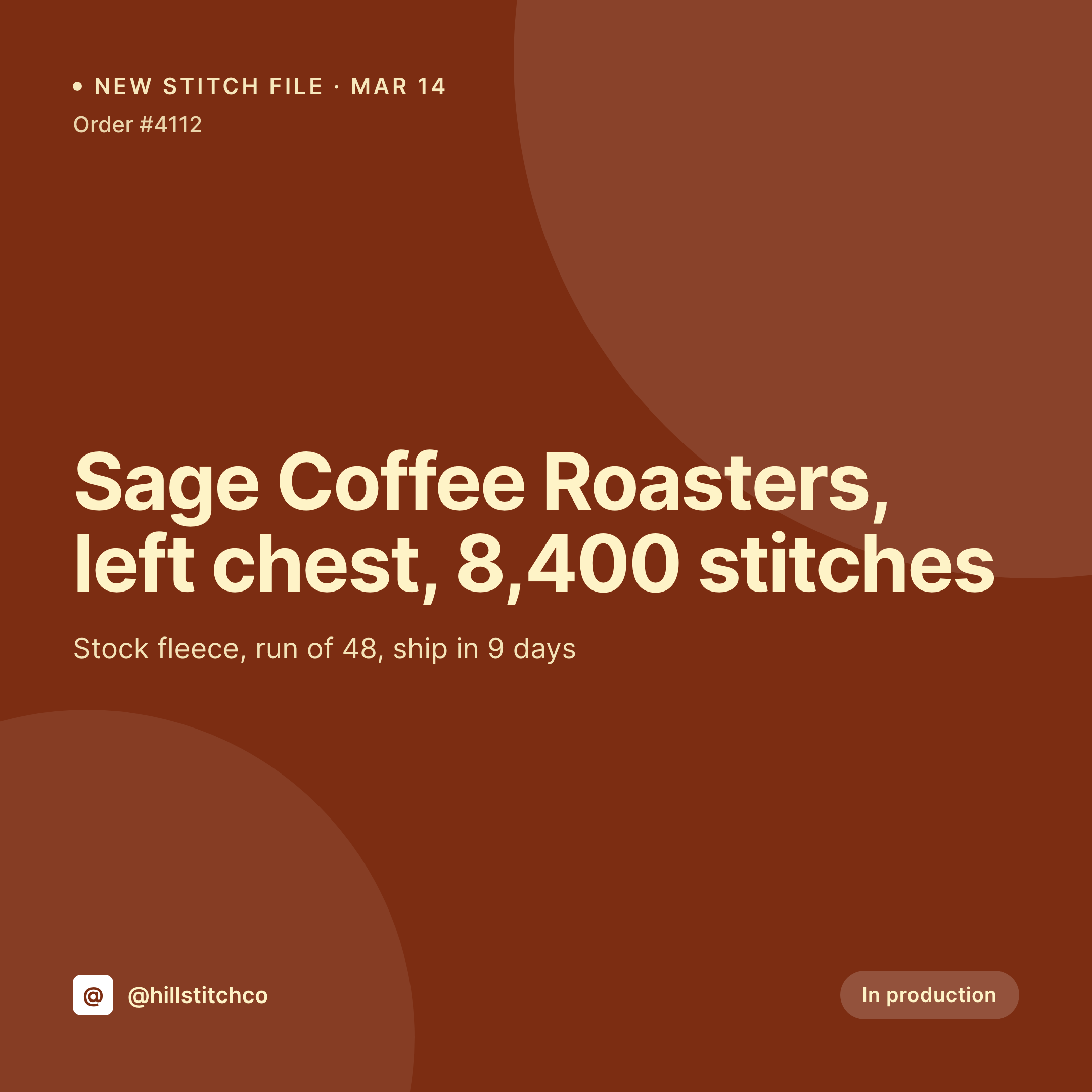
Sample photos, stitch counts, and the daily card grind
An embroidery shop's grid lives on small proof posts. A new digitized file with the customer's logo, the first sample off the machine, a stack of fleece pulled out of the press, a bulk run packed for shipping. Each one is a square image with the customer name, the stitch count, the run size, and a thumbnail of the file. Each one needs to ship while the order is still moving through the shop, not three days later.
The data is already on the WordPress site. Most embroidery shops run a custom order CPT or a WooCommerce product with ACF fields for stitch count, thread colors, run quantity, and lead time. The proof photo is in the media library after the operator pulls it off the hoop. The typing has been done at the time the quote was approved. The gap is the 1080x1080 PNG that the front office would otherwise rebuild in Canva every time a customer asks for a status post.
SleekPixel removes that gap. The order post saves with the proof photo, the card lands in uploads with the stitch count, the run size, and the lead time already set. The front office posts the card from the Gutenberg sidebar while the next hoop is loading. The grid stays consistent because the template doesn't move, even when the operator does.
Workflow
From order entry to grid card
Map order and digitizing fields
Design one square template
Update the order on the floor
Post from the front office
Output
What gets generated per order
A 1080x1080 square card with the customer name, the stitch count, the run size, the lead time, and the shop's brand mark. Pulled from the order post fields.
Comparison
Default embroidery shop image vs SleekPixel
Default embroidery shop image
- Front office builds a Canva card per order when a customer wants a status post
- Stitch counts and thread colors get retyped wrong between the order sheet and the card
- Lead time on the card drifts away from what production scheduling is quoting
- Hat patches, fleece chest hits, and jacket back hits all end up with different fonts
- Multiple operators each post their own off-brand variant from the floor
SleekPixel
- Save the order post, the 1080x1080 proof card lands in uploads
- Stitch count, thread list, run size, and lead time pulled live from the post
- Square format sized for Instagram and Facebook grids
- Sidebar download from Gutenberg so the front office can post in seconds
- One template across operators and locations keeps every order on-brand
Features
What SleekPixel gives you for embroidery shop
Card per order
Every order, sample run, and digitizing job saves with a square image. The customer name, stitch count, and run size come from the post.
Thread colors mapped
Madeira or Isacord codes from the order render as small swatches on the card so the proof reads as a real production sheet.
Front office fast lane
Order is updated on the floor, the proof card is already in uploads. The front office downloads it from the sidebar and posts.
Use cases
Who uses SleekPixel for embroidery shops
Apparel decoration shops
Left chest fleece, jacket back hits, hat patches, and polo runs each render with the matching stitch count and run size.
Corporate uniform programs
Recurring orders for restaurants, dental offices, and trades render with the customer logo and order number pulled live.
Custom patch and emblem makers
Limited-run patches and morale emblems get their own card-per-batch treatment, ready for the shop's social and shop listing.
The bigger picture
Why embroidery shop grids look scattered without a system
An embroidery shop is half production, half retail. The production side wants order numbers, stitch counts, and lead times pinned to every proof. The retail side wants a feed that looks considered enough that a head of marketing at a coffee roaster will send the next 200-unit fleece order over.
The two sides don't naturally agree, and the result is usually a grid where some cards are screenshots from the order sheet and others are Canva files built by whoever was at the front desk that day. The fix is to derive the card from the order, not from a designer's discretion. The customer name, the stitch count, the run size, and the lead time live in the order CPT already.
Saving the order renders the card with those fields locked into a template the owner picked once. The grid reads as one shop across a year of changing operators, and the production data on every card matches the quote the customer is holding.
Questions
Common questions about SleekPixel for embroidery shop
Yes. Thread codes typed into an ACF field render as small swatches on the card. Any color system can be used, including Madeira, Isacord, and Robison-Anton.
Both work. SleekPixel reads any post type and any field, so a custom order CPT or a WooCommerce product with ACF fields both map onto the template.
Yes. The operator name or machine ID can be a field on the order post and render on the card if the template includes it. Many shops leave that off the public card and keep an internal version.
Templates can be conditional on category or product type. A flat embroidery order uses one layout, a hat patch order another, all pulling from the same fields.
Yes. Editing the order post after digitizing, sampling, or production re-renders the card with the new status. The image attached to that order is always current.
Yes. The OG image on the order page is wired to the same render, so a customer pasting the link into Slack or email sees the proof in the preview card.
No. SleekPixel renders the image and saves it to uploads. Posting is a manual step from the platform app or a scheduling tool.
No. SleekPixel renders static PNG and JPG only. Stitch-out videos and animated proofs are out of scope, the focus is still images tied to the order data.
Pricing
More than 1000+
happy customers
Explore our flexible licensing options tailored to your needs. Upgrade your license anytime to access more features, or opt for a lifetime license for ongoing value, including lifetime updates and lifetime support. Our hassle-free upgrade process ensures that our platform can grow with you, starting from whichever plan you choose.
Lifetime ♾️
Most popular
EUR
once
- Unlimited websites
- Lifetime updates
- Lifetime support
...or get the Bundle Deal
and save €250 🎁
💎 Want everything forever? The All Access Pass is going away on 01.08.2026.
The Bundle (unlimited sites)
Pay once, own it forever
Elevate your WordPress site with our exclusive plugin bundle that includes all of our premium plugins in one package. Enjoy lifetime updates and lifetime support. Save significantly compared to buying plugins individually.
What’s included
-
SleekAI
-
SleekByte
-
SleekMotion
-
SleekPixel
-
SleekRank
-
SleekView
€749
Continue to checkoutBrowse more
- TikTok profile banners
- YouTube Music cover art
- Mastodon link previews
- YouTube end cards
- Facebook post images
- Twitch camera frame
- TikTok cover images
- Lemon Squeezy product covers
- Farcaster cast images
- Substack post thumbnail
- Pinterest video pin covers
- Twitch offline banners
- Telegram channel banner
- Linktree banner image
- Passes page banner