






SleekPixel for screen printing shop
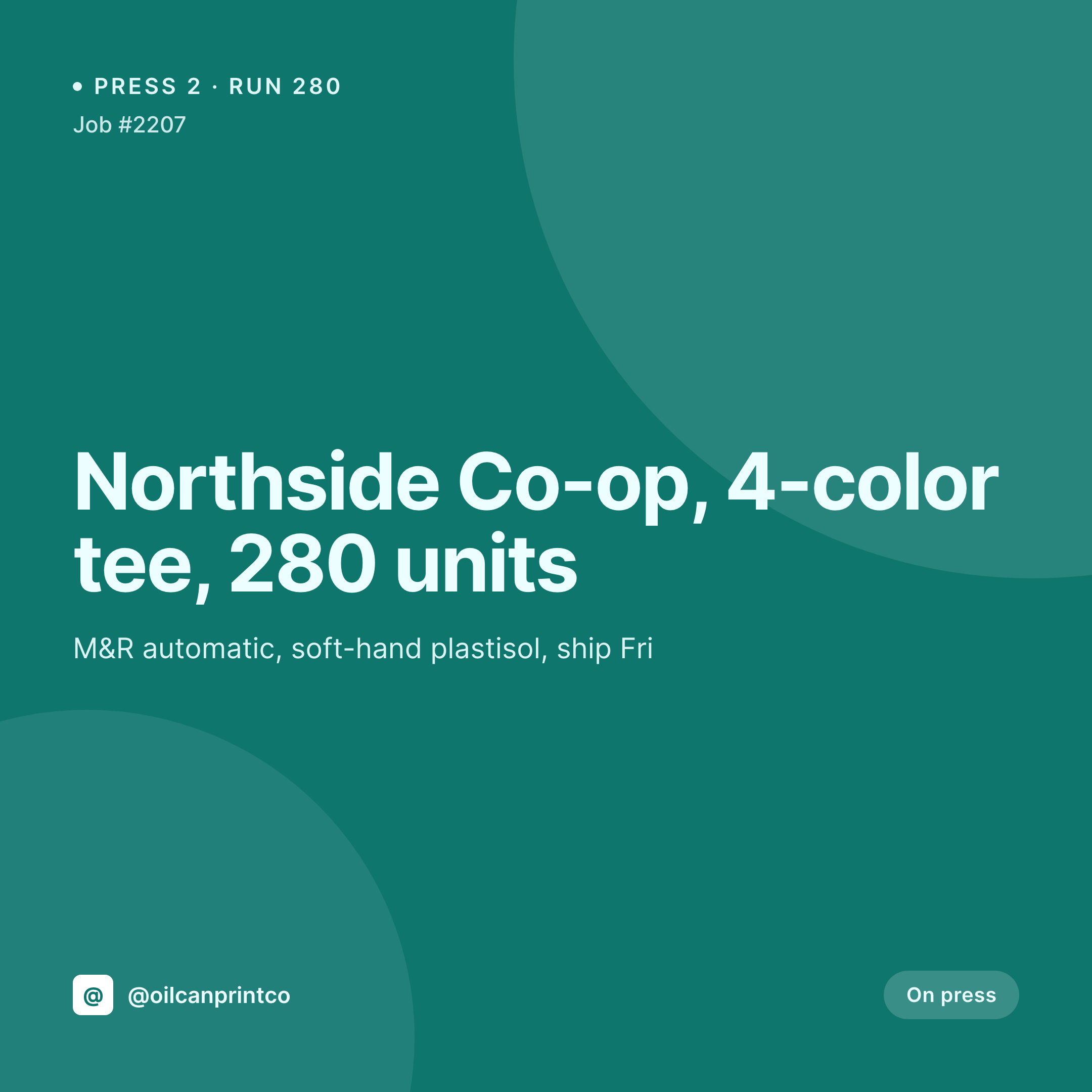
Four-color tee run for a band, a 200-unit hoodie pull, a sampling poster pressed off a single screen. Each job on the shop CPT renders into a 1080x1080 card the front office can post the day the press runs.
♾️ Lifetime License available
Press runs, color separations, and the daily card grind
A screen printing shop's social feed is one of the best sales tools the shop has. A band's tour tee on the press, a coffee shop's anniversary run, a coworking space's onboarding hoodies. Each post is a quick proof that the shop is busy and that the work looks right. Each one needs a 1080x1080 card with the customer name, the color count, the run size, and a clean photo of the print pulled off the press.
The data is already on the WordPress site. The shop runs an order CPT or a WooCommerce product with ACF fields for color count, ink type, garment, and run size. The press photo gets attached the moment the operator pulls a test print. The work of typing all of that is done. The gap is the card itself, the PNG that the front office would otherwise rebuild in Canva every time the shop wants to post a job update.
SleekPixel renders that PNG on save. The order post updates with the press photo, the 1080x1080 card lands in uploads with the color count, run size, and ship date already locked in. The front office posts before the next setup goes on press. The grid looks like one shop across a season of changing jobs and operators.
Workflow
From job entry to press card
Map order and press fields
Design one square template
Update the order on press
Post from the front office
Output
What gets generated per press run
A 1080x1080 square card with the customer name, color count, run size, ink type, and ship date. Pulled from the order CPT or WooCommerce product.
Comparison
Default screen printing shop image vs SleekPixel
Default screen printing shop image
- Front office builds a Canva card per job when a customer wants a press shot post
- Color count and ink type on the card drift from what the production sheet says
- Ship date on the card lags behind what scheduling moved it to overnight
- Band tees, corporate runs, and posters each end up with mismatched fonts
- Sister shops or contract print partners post off-brand versions of the same job
SleekPixel
- Save the order post, the 1080x1080 press card lands in uploads
- Color count, ink type, garment, run size, and ship date pulled live from the post
- Square format sized for Instagram and Facebook grids
- Sidebar download from Gutenberg so the front office can post in seconds
- One template across operators and shops keeps every print on-brand
Features
What SleekPixel gives you for screen printing shop
Card per press run
Every job, sample, and bulk run saves with a square card. The customer, color count, and run size come from the order, not a duplicated Canva file.
Ink and color tags
Plastisol or water-base, soft-hand or athletic, four-color or simulated process. The tags from the order render onto the card so the post reads as a real production sheet.
Front office fast lane
Operator updates the order on the floor, the press card is already in uploads. The front office downloads it from the sidebar and posts.
Use cases
Who uses SleekPixel for screen printing shops
Band and merch shops
Tour tees, hoodies, and one-off poster runs each render with the band name, color count, and run size pulled from the order.
Contract print shops
Wholesale jobs for brands and other print shops render with the customer's order number and run size, with the option to mask the customer name on public posts.
School and team apparel programs
Team kits, spirit-week tees, and graduation runs each get their own press card on the day the order moves to the dock.
The bigger picture
Why screen printing shop grids drift without automation
A screen printing shop's feed is a sales channel. A band scrolling Instagram sees a clean, considered press shot from a shop and books the next tour run there instead of with a faceless online printer. That sales channel only works if the grid is consistent week to week, but most shops design each card in Canva on the day, with whoever is at the front desk making decisions about font and spacing.
The result is a feed that drifts in feel even when the prints themselves are tight. The fix is to derive the card from the order. The customer, the color count, the run size, and the ship date live in the order CPT already.
Saving the order renders the card with those fields into a template the owner picked once. The grid reads as one shop across a year of band tours, school orders, and one-off runs. The customer who books the next 500 hoodies sees a shop that runs like a real production house, not a side project squeezed between press changes.
Questions
Common questions about SleekPixel for screen printing shop
Yes. Any field typed into the order post renders into the template. Plastisol, water-base, discharge, and garment brand all map onto the card.
Both work. SleekPixel reads any post type and any field, so a custom job CPT or a WooCommerce product with ACF fields both feed the same template.
Yes. The template can read a field like is_confidential and swap the customer name for a generic label. The internal version keeps the real customer for shop records.
Templates can be conditional on order type. A screen run uses one layout, embroidery another, DTG a third. All pull from the same order CPT and ACF fields.
Yes. Editing the order from in-art to on-press to packed re-renders the card. The latest version of the file is the one tied to the order URL.
Yes. The OG image on the order page is wired to the same render. A customer pasting the URL into Slack or email sees the press card in the preview.
No. SleekPixel renders the image and saves it to uploads. Posting is a manual step from the platform app or a scheduling tool.
No. SleekPixel renders static PNG and JPG only. Press videos and time-lapse content are out of scope, the focus is still images tied to the order data.
Pricing
More than 1000+
happy customers
Explore our flexible licensing options tailored to your needs. Upgrade your license anytime to access more features, or opt for a lifetime license for ongoing value, including lifetime updates and lifetime support. Our hassle-free upgrade process ensures that our platform can grow with you, starting from whichever plan you choose.
Lifetime ♾️
Most popular
EUR
once
- Unlimited websites
- Lifetime updates
- Lifetime support
...or get the Bundle Deal
and save €250 🎁
💎 Want everything forever? The All Access Pass is going away on 01.08.2026.
The Bundle (unlimited sites)
Pay once, own it forever
Elevate your WordPress site with our exclusive plugin bundle that includes all of our premium plugins in one package. Enjoy lifetime updates and lifetime support. Save significantly compared to buying plugins individually.
What’s included
-
SleekAI
-
SleekByte
-
SleekMotion
-
SleekPixel
-
SleekRank
-
SleekView
€749
Continue to checkoutBrowse more
- X Space banners
- Instagram highlight covers
- YouTube Music cover art
- Lemon8 post
- Spotify playlist cover
- Bluesky profile banners
- podcast cover art
- Instagram carousel slides
- TikTok shop images
- Instagram Reels covers
- Poshmark listing images
- Beacons.ai banner
- TikTok cover images
- Buy Me a Coffee banners
- Klaviyo email headers