






SleekPixel for course creator
Course landing pages, lesson previews, and alumni testimonials on a course creator's site already carry cohort numbers, dates, and seat counts. SleekPixel renders a 1200x630 share card on save so applicant forwards and Twitter shares arrive looking like the course.
♾️ Lifetime License available
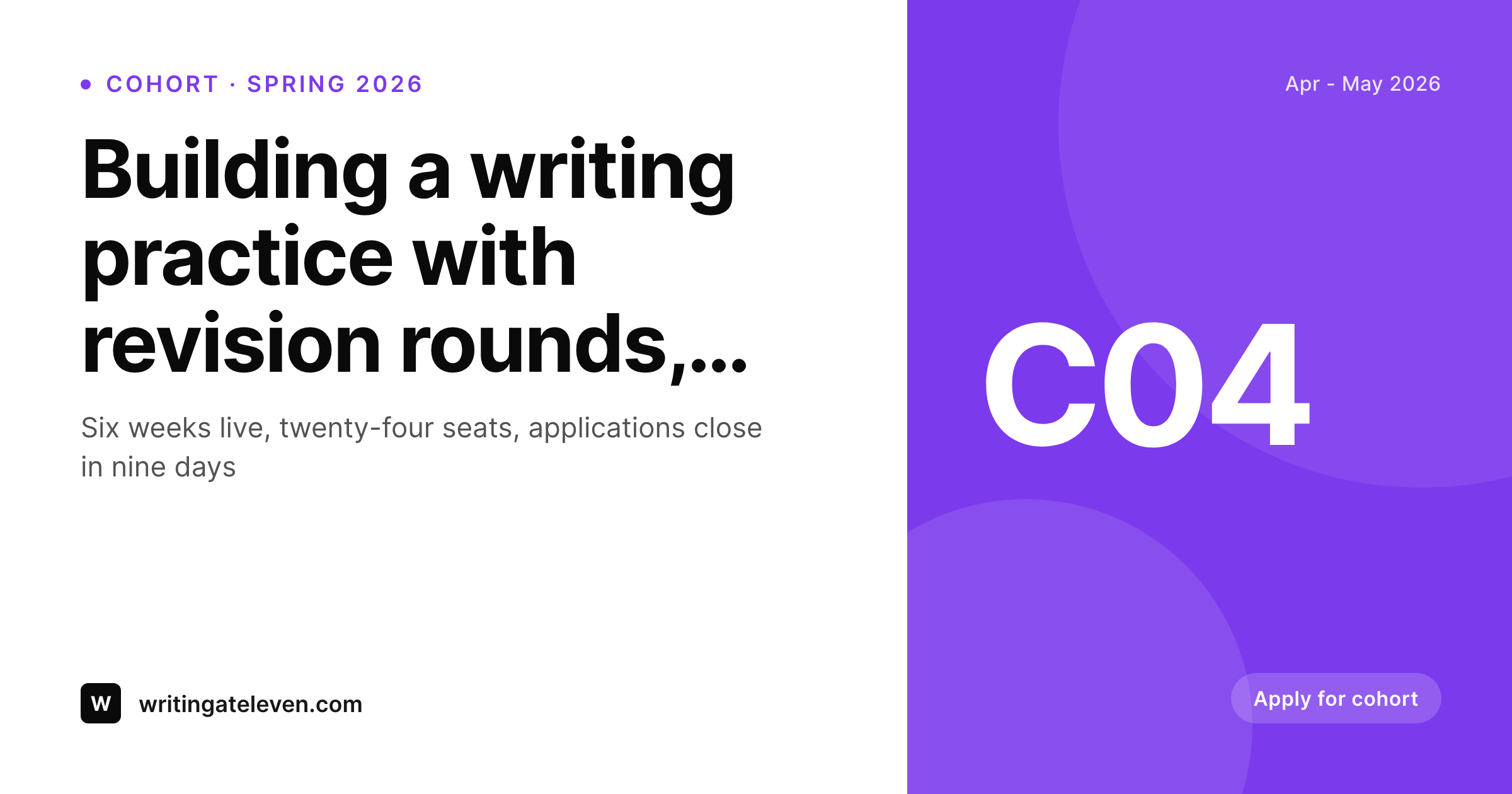
Cohort applications spread through forwarded links and peer recommendation
An independent course creator running a six-week cohort program lives or dies on the application funnel. Cohort capacity is finite (twenty-four seats, sixty seats, never thousands), and the application window is finite (open for two weeks, then closed until the next cohort). Within that compressed window, applicants discover the course almost entirely through peer recommendation. A past student tells a friend, a Twitter thread surfaces the cohort, a guest podcast appearance routes listeners to the landing page. Every one of those discovery paths terminates in a forwarded URL, and the share preview is what the new prospect sees first.
The default WordPress preview is hostile to that funnel. A theme banner over the cohort page strips the cohort identity, the seat count, the dates, the visual signal that this is a real selective program rather than a mass-market video library. Applicants forwarding the URL to a Slack workspace or a peer DM see a generic blog-looking preview, and the link reads as 'someone's website' rather than 'the spring cohort I keep telling you about'. The forward decays in transit, applications come in below capacity, and the cohort ships with empty seats.
SleekPixel renders a branded share card on every cohort, lesson, and testimonial save. Cohort number, dates, seat count, and instructor name all pull from post fields. The card matches the course's visual identity, signals selectivity, and names the cohort. Forwarded URLs arrive looking like the program itself, peer recommendations carry the right context, and the application funnel holds capacity through the compressed window when discovery actually happens.
Workflow
From cohort page to branded preview in one save
Set the course template
Map cohort post fields
Save the cohort page
Applicants forward the link
Output
What renders on every cohort and lesson save
A 1200 by 630 share card carrying the cohort number, dates, seat count, and instructor name. Used as og:image and twitter:image so peer forwards arrive branded.
Comparison
Theme banner vs auto-rendered cohort cards
Theme default / Hero crop
- Theme default banner sits over every cohort and lesson page
- Cohort dates and seat counts never reach the share preview
- Selectivity signal is lost, course reads as a generic blog post on forward
- Lesson preview pages share with no cohort context attached
- Old cohort pages share with prior brand templates after a refresh
SleekPixel
- Every cohort and lesson page saves with a branded 1200x630 share card
- Cohort number, dates, seat count, instructor name pull from post fields
- Application-closing-soon urgency badge can render conditionally
- Bulk re-render the archive after a brand or instructor update
- Twitter card variant renders alongside the OG card on the same save
Features
What SleekPixel gives you for course creator
Per-cohort share card
Every cohort landing page saves with a 1200x630 card carrying the cohort number, dates, and seat count. Selectivity travels with the link forward.
Application urgency
Conditional badge renders 'closes in N days' when the application deadline approaches. Forwarded links carry the urgency signal directly in the preview.
Testimonial cards
Alumni testimonial pages render share cards with the alum name and cohort year. Useful when alumni share their own pages as references for the program.
Use cases
What course creators generate with SleekPixel
Cohort landing pages
Each cohort opens with a landing page that ships a branded share card. Twitter threads, podcast forwards, and DM recommendations arrive with the cohort named.
Lesson previews
Free lesson previews and sample readings render share cards naming the lesson and the cohort it comes from. Peer forwards stay anchored to the course.
Alumni testimonials
Testimonial pages render branded cards with the alum and cohort. Alumni sharing their own profile pages effectively endorse the program at the share step.
The bigger picture
Why cohort applications depend on share preview quality
Cohort-based courses run on a fundamentally different growth curve from on-demand video products. On-demand courses can spend years compounding SEO and slowly building a sales funnel. Cohort courses have a fixed application window (often two to four weeks), a fixed seat count (often dozens, occasionally low hundreds), and a fixed start date.
Every cohort is essentially a launch, and every launch depends on intense peer recommendation during the application window. The share preview is the first signal a prospect sees when a peer forwards the URL, and the prospect makes a fast judgment about whether this is a serious program worth applying to or a generic content product. A clean branded share card with the cohort number, the dates, the seat count, and the instructor name signals selectivity and effort.
A theme default banner signals neither. Across the dozens to hundreds of forwards a single cohort earns during its application window, the cumulative effect of strong previews compounds directly into application volume, and application volume directly determines whether the cohort fills. The second reason is cohort archive value.
Past cohort pages remain on the site as social proof for future cohorts. Alumni point new prospects at past testimonial pages, and the share previews on those pages carry the program's identity to audiences who weren't around for the original launch. SleekPixel handles new cohort pages and the archive refresh in one mechanism, so the archive grows with consistent visual identity instead of fragmenting across years.
Questions
Common questions about SleekPixel for course creator
SleekPixel is a WordPress plugin. Teachable and Thinkific are external platforms with their own preview generation. What it does cover: WordPress landing pages, blog posts, and free preview pages that route to the external platform. Most course creators have a WordPress marketing site that sits in front of the platform, and SleekPixel handles the share cards there.
Yes. Configure a deadline date field on the cohort page, and the template can render a 'closes in N days' badge that updates as the deadline approaches. The image regenerates daily via cron during the open window so the urgency signal stays accurate. Once the deadline passes, the badge swaps to 'cohort full' or hides.
Yes. Both LearnDash and LifterLMS expose courses and lessons as WordPress post types. SleekPixel reads those post types, pulls the lesson title, course name, and module reference, and renders a share card per lesson. Free lesson previews ship with branded cards that name the parent course.
Yes. Add an accent field to the cohort post type, and the template pulls it per cohort. Spring cohort renders one color, fall cohort another. Useful when running multiple cohort tracks (writing, design, strategy) and wanting visual differentiation in shares without separate templates.
Discord and Slack both render og:image when links are pasted. The SleekPixel-rendered card loads in alumni community channels, so when an alum points new prospects at the cohort page, the preview signals the program clearly. The plugin does not interact with Discord or Slack APIs directly.
Yes. Testimonial pages with alumni photo, name, and cohort fields render share cards combining all three. The alum becomes the visual anchor, the cohort number provides social proof, and the share preview functions as a portable testimonial when alumni share their own profile pages.
Multiple instructor names render in the slot designated for instructor identity. Configure the field as a multi-value taxonomy or a comma-separated text, and the template handles up to a configured maximum (typically two or three names) before truncating. Larger faculty rosters can show on the page body but not on the share card.
Yes. Bulk re-render walks every cohort, lesson, and testimonial page and refreshes the share image to the latest template. Useful after a curriculum revision, an instructor change, or a visual identity refresh. The full archive returns to coherence without per-page edits, which matters when alumni still share old cohort pages as references.
Pricing
More than 1000+
happy customers
Explore our flexible licensing options tailored to your needs. Upgrade your license anytime to access more features, or opt for a lifetime license for ongoing value, including lifetime updates and lifetime support. Our hassle-free upgrade process ensures that our platform can grow with you, starting from whichever plan you choose.
Lifetime ♾️
Most popular
EUR
once
- Unlimited websites
- Lifetime updates
- Lifetime support
...or get the Bundle Deal
and save €250 🎁
💎 Want everything forever? The All Access Pass is going away on 01.08.2026.
The Bundle (unlimited sites)
Pay once, own it forever
Elevate your WordPress site with our exclusive plugin bundle that includes all of our premium plugins in one package. Enjoy lifetime updates and lifetime support. Save significantly compared to buying plugins individually.
What’s included
-
SleekAI
-
SleekByte
-
SleekMotion
-
SleekPixel
-
SleekRank
-
SleekView
€749
Continue to checkoutBrowse more
- Threads profile banner
- Pinterest pins
- Etsy listing images
- Odnoklassniki banners
- VK community cover photos
- Vimeo thumbnails
- Mastodon post images
- Weibo post images
- Dailymotion thumbnails
- KakaoTalk channel banners
- YouTube end screens
- Twitter card images
- Shopify collection banners
- Twitch profile banner
- Xiaohongshu cover images